
ASUS Dual RTX 5060 Ti 8GB vs 16GB White: which should you buy?
Buy the 16GB White OC if its delivered price fits your budget and you want to play demanding new games at high textures, 1440p or with ray tracing. The 8GB OC is a sensible lower-cost choice for 1080p play when you are happy to adjust settings and its saving is meaningful to you. These exact ASUS boards list the same GPU, clocks, case dimensions and power connection. The extra memory is the performance-relevant difference, not an upgrade to a faster chip.
Compare exact modelsCalculate your price gapAffiliate disclosure: MyGPU Australia may earn a commission from qualifying purchases through the product links below. Check the model code, seller, condition and delivered price before ordering.
These two ASUS cards share almost everything on the spec sheet
The black 8GB board is DUAL-RTX5060TI-O8G. The white 16GB board is DUAL-RTX5060TI-O16G-WHITE. A shop listing that merely says “RTX 5060 Ti” leaves out the decision that matters most here. Confirm the complete name before comparing its price with another seller’s offer.
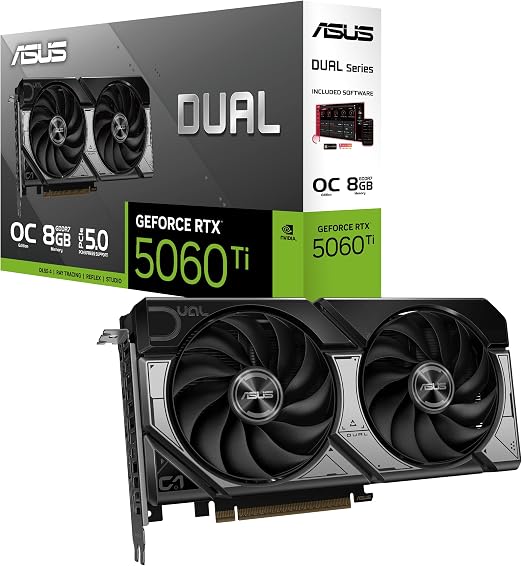
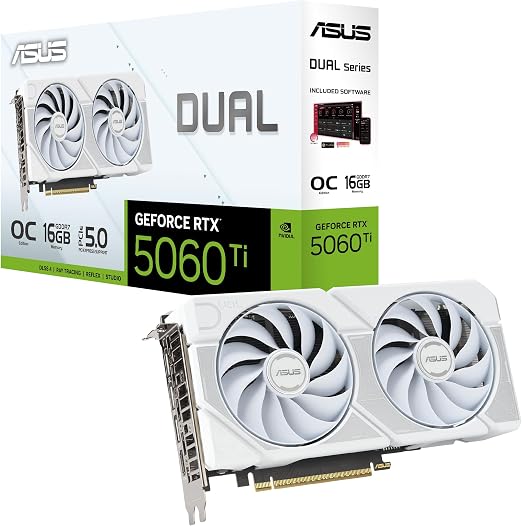
| ASUS specification | 8GB OC | 16GB White OC |
|---|---|---|
| Memory | 8GB GDDR7 | 16GB GDDR7 |
| Memory speed and bus | 28Gbps, 128-bit | 28Gbps, 128-bit |
| CUDA cores | 4,608 | 4,608 |
| Listed boost clock | 2,602MHz default; 2,632MHz OC mode | 2,602MHz default; 2,632MHz OC mode |
| Size and slot width | 229 × 120 × 50mm; 2.5 slots | 229 × 120 × 50mm; 2.5 slots |
| Connection and PSU guidance | One 8-pin; 550W recommended system PSU | One 8-pin; 550W recommended system PSU |
| Display outputs | 3 × DisplayPort 2.1b; 1 × HDMI 2.1b | 3 × DisplayPort 2.1b; 1 × HDMI 2.1b |
| Bus standard and finish | PCIe 5.0; black | PCIe 5.0; white |
Specifications: ASUS 8GB OC and ASUS 16GB White OC. Regional pages describe these exact model codes. ASUS bases its 550W recommendation on a fully overclocked GPU and CPU system; it is system guidance, not measured card draw.
What doubling VRAM can change
VRAM holds the textures, render targets and other data a game needs close to the GPU. When a chosen workload fits inside 8GB, doubling capacity does not double frame rate. Both boards have the same listed cores, clocks, memory speed and 128-bit interface. In a lighter game at 1080p, the result can therefore be close. When the 8GB card runs short, the game may stream assets more aggressively, lower texture quality, stutter, or fail to run a particular settings combination. Extra capacity removes that specific bottleneck; it does not make every game run twice as fast.
Installed memory capacity
Zero baseline; 16GB maximum. This compares installed capacity, not FPS or measured memory use.
Illustration of memory pressure only. The drawn 11GB workload is hypothetical; actual allocation, streaming and performance vary by game and settings.
Texture settings are often the first useful adjustment on the 8GB board. Ray tracing and frame generation may also increase memory pressure in some games. Upscaling can help rendering cost, yet it does not guarantee that every combination of textures and effects will fit. Watch the picture as well as an FPS counter: missing textures and uneven frame times matter even when an average frame rate looks acceptable.
Game results show a conditional, sometimes large gap
Tom’s Hardware’s 21-game test found the 8GB version just 2.3% behind the 16GB version at 1080p medium, but 18% behind at 1440p ultra across its tested games. The ray tracing subset at 1440p ultra had a 39.6% deficit. Those are results for the tested RTX 5060 Ti configurations and suite, not a benchmark of these exact ASUS Dual boards. They show why a single claim such as “16GB is always faster” would mislead you.
TechSpot’s side-by-side testing found that Hogwarts Legacy at native 1440p Ultra showed similar average frame rates, while the 8GB card had texture pop-in. At 1440p High with High ray tracing in that same game, the 16GB card recorded 62% higher average FPS and much stronger 1% lows. TechSpot tested ASUS Prime cards with a PCIe 5.0 system, so these figures illustrate the capacity issue rather than a measured Dual-board advantage. Your CPU, platform, game patch and settings will affect the outcome.
Do not read the benchmark percentages as a universal upgrade
A 39.6% gap in one ray tracing test subset is not a promise for all games. The useful pattern is narrower: the versions can be close at modest settings, then separate sharply when the 8GB limit is reached. If your regular games and settings never approach that limit, the premium buys headroom rather than an immediate FPS gain.
Creators may also need capacity for a scene, texture set or local model that does not fit in 8GB. Extra VRAM helps keep that data resident; it does not automatically double rendering throughput. Check your own application’s model-size and project requirements before buying either one. MyGPU’s VRAM explainer covers the basic distinction between capacity and processing speed.
The white cooler does not cost you extra case length
ASUS lists both at 229 × 120 × 50mm and 2.5 slots. If one fits by the published board dimensions, the other has the same listed footprint. Check the case’s GPU clearance after any front radiator or fans, leave room for the power cable, and make sure adjacent expansion slots are available. A white themed build may make the finish valuable to you, but the finish itself is not a speed feature.
Both require one 8-pin PCIe power connector. Both have three DisplayPort 2.1b outputs and one HDMI 2.1b. The 550W recommendation is ASUS system guidance under its stated overclocked system assumption. Check the actual PSU’s quality, available connector and the rest of your build; do not infer that either card itself consumes 550W.
Conceptual outlines; use the published dimensions for case planning.
Compare the actual delivered price gap
There is no useful permanent price threshold for this choice. The 16GB model might carry a substantial premium because of both memory and its white finish. Enter current delivered AUD quotes for the exact model codes from sellers you would trust. The calculation shows the cash difference and the premium as a percentage of the 8GB price; it does not pretend to value your games or the finish for you.
Illustration: if the 8GB quote is A$700 and the 16GB quote is A$840, the 16GB card costs A$140 more, or 20% above the 8GB price. These are example inputs, not live offers.
For competitive 1080p gaming at reduced settings, a strong saving on the 8GB card can be put toward another part of the build. For high texture settings, heavier new games, 1440p, ray tracing or work that can exceed 8GB, give the 16GB option serious weight. Compare the 16GB quote against other available 16GB GPUs as well; the white finish may be priced separately from the memory upgrade. MyGPU’s Australian GPU price tracker can help you record comparable quotes.
Check 8GB OC listingCheck 16GB White listing
Affiliate destinations were supplied for these products. Verify that each destination still shows the exact ASUS model, available stock and the delivered Australian price.
The 16GB White is the better long-term match for demanding settings
If the price gap is manageable, the 16GB White OC avoids the hard 8GB capacity limit while keeping the same listed form factor and clocks. It is the more comfortable choice when you want high textures or ray tracing without routinely tuning settings around memory. The 8GB OC still has a place when the deal is appreciably cheaper, your actual games run well at your chosen 1080p settings, and you accept that some newer titles will need compromises.
Neither card is a blanket solution for maximum settings at every resolution. Both still use the same RTX 5060 Ti GPU and 128-bit memory interface. For a separate view of the GPU family, read MyGPU’s RTX 5060 Ti guide and its 16GB versus 8GB VRAM guide.
Three checks at checkout
- Match the code: O8G for the black 8GB board or O16G-WHITE for the white 16GB board.
- Compare the delivered AUD total and seller terms, including any stock-condition differences.
- Measure 229mm length and 50mm thickness in your finished case, then confirm one available 8-pin PCIe lead.
Frequently asked questions
Is the 16GB White OC twice as fast as the 8GB OC?
No. The ASUS specifications list identical cores, clocks and memory speed. Independent RTX 5060 Ti tests show close results in lighter settings and much larger gaps when 8GB becomes restrictive. Twice the installed capacity is not twice the GPU processing power.
Are these exact ASUS cards the same size?
Yes. ASUS lists 229 × 120 × 50mm and 2.5 slots for each model. Allow additional room for the power lead and any case hardware.
Is 8GB enough for 1080p?
It can be for many games, especially with medium settings. Demanding titles with high textures or ray tracing can exceed the comfortable 8GB range even at 1080p. Check tests for the games and settings you actually use.
Does the white version need a different PSU connector?
No. Both ASUS specification pages list one 8-pin PCIe connector and a 550W recommended system PSU under ASUS’s overclocked-system assumption.
Can DLSS make the 8GB card equivalent to the 16GB one?
Upscaling can reduce rendering cost in supported games, but it cannot add physical VRAM. Texture assets and effects can still put pressure on the 8GB buffer.
Sources and method
This is a specification and published-test comparison. MyGPU has not claimed hands-on measurements of these two exact Dual boards. Manufacturer specifications establish their physical and electrical details; independent same-GPU tests describe how an 8GB limit can affect gaming.