
MSI GeForce RTX 5060 Ti 8G Ventus 2X OC White Review
A compact white RTX 5060 Ti for high-quality 1080p gaming, sensible 1440p use and clean themed builds. The dual-fan design is easy to understand, but the 8GB memory capacity and live Australian price decide whether it is the right version for you.
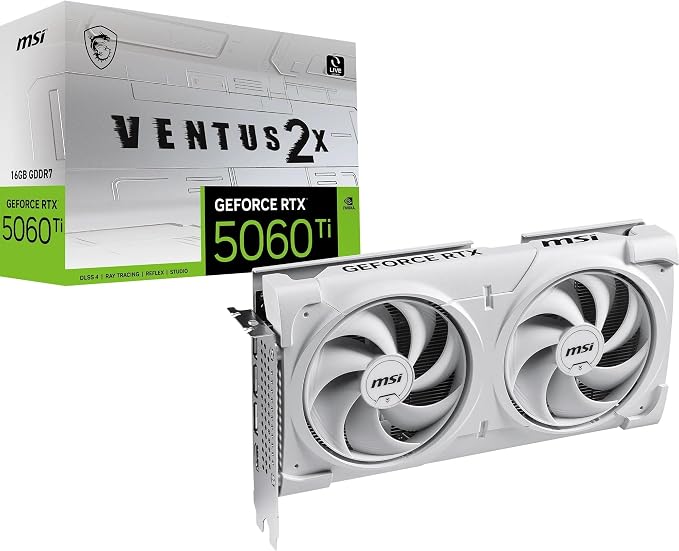
A focused white-build card with one big buying question
The hardware story is straightforward. You get the RTX 5060 Ti GPU, a compact dual-fan cooler, current display outputs and a standard 8-pin connector. The difficult part is deciding whether 8GB is enough for the way you play.
This score reflects specification, usability and buyer fit. It is not a laboratory benchmark score.
Best for a polished 1080p build when the price is right
The MSI Ventus model avoids an oversized cooler and unusual power connector. It makes the most sense for someone who values a white aesthetic, compact dimensions and NVIDIA features without moving into a higher GPU tier.
- Strongest use: high-quality 1080p gaming and esports on a fast monitor.
- Reasonable stretch: 1440p with settings chosen around the game and memory demand.
- Main limitation: 8GB provides less memory headroom than the 16GB version.
- Main value test: compare the delivered Australian price with the 16GB card and RTX 5070.
Important: the marketplace title appears to contain a memory-bus error
The supplied listing title says 256-bit. MSI lists model G506T8V2CWP with an 8GB GDDR7, 128-bit memory configuration. MSI also separates the 2602 MHz boost clock from the 2617 MHz Extreme Performance setting in MSI Center. Check the exact model code on the live listing before buying. Read MSI's official specification →
What is actually inside the MSI Ventus 2X OC White
The table uses MSI's official White Plus model page and NVIDIA's RTX 5060 Ti family specifications. It does not repeat unverified marketplace wording.
| GPU | NVIDIA GeForce RTX 5060 Ti |
|---|---|
| MSI model code | G506T8V2CWP |
| CUDA cores | 4,608 |
| Memory | 8GB GDDR7 |
| Memory speed | 28 Gbps |
| Memory bus | 128-bit |
| Boost clock | 2602 MHz |
| Extreme Performance | 2617 MHz through MSI Center |
| Interface | PCI Express Gen 5 x16, operating at x8 |
| Display outputs | 3 x DisplayPort 2.1b, 1 x HDMI 2.1b |
| Power consumption | 180W |
| Power connector | 1 x 8-pin |
| Recommended PSU | 600W |
| Dimensions | 227 x 126 x 41 mm |
| Card weight | 600 g |
| Maximum displays | 4 |
| Maximum digital resolution | 7680 x 4320 |
Sources: MSI model specifications and NVIDIA RTX 5060 family specifications. Manufacturer specifications can change by market or revision.
1080p is the natural target, while 1440p needs a little judgement
These are editorial fit ratings, not invented frame-rate results. Actual performance changes with the game, CPU, graphics preset, ray tracing, DLSS mode and driver.
Best match for high settings, fast monitors and buyers who want headroom without stepping into a higher GPU class.
Practical in many games, but heavy textures, ray tracing and future releases can make the 8GB memory limit more relevant.
The display outputs support high resolutions, but output capability is not the same as comfortable native 4K gaming performance.
Do not judge 8GB as automatically bad or automatically enough
VRAM capacity is one part of the card. The practical question is whether the games, textures, resolution and secondary workloads you use fit comfortably within that memory budget.
Where 8GB makes sense
A price-conscious 1080p build, esports, lighter creator work and games that behave well within 8GB can make this version a sensible choice.
Where 16GB adds breathing room
High-resolution texture packs, demanding 1440p games, video work, 3D applications and local AI use can make extra memory more valuable.
Compact, white and easier to fit than many oversized cards
MSI uses two STORMFORCE fans, heat pipes and a vented reinforcing backplate. That makes this model visually suited to a white build without turning a mid-tier card into a very large three-fan product.
Dual STORMFORCE fans
Two fans keep the card compact. Noise and temperatures still depend on case airflow, room temperature, fan curve and load.
Heat-pipe cooling
Heat pipes move thermal energy away from the GPU into the fin stack. This is a conventional and practical cooling layout.
Vented backplate
The backplate adds reinforcement and includes an airflow opening so exhaust can pass through rather than stopping at a solid plate.
Airflow path
The diagram shows the intended idea, not measured thermal data.
Display connection map
Three DisplayPort 2.1b connections and one HDMI 2.1b connection support up to four displays.
DLSS, ray tracing and creator tools add value when you actually use them
The RTX 5060 Ti is built on NVIDIA's Blackwell architecture with fifth-generation Tensor Cores and fourth-generation ray-tracing cores. NVIDIA lists DLSS 4, Reflex, Broadcast, Studio Drivers, AV1 support and related RTX tools for the family.
DLSS and Multi Frame Generation
Supported games can use AI-assisted rendering features to improve performance and image quality. Results vary by game, mode and base frame rate.
Ray tracing
Fourth-generation RT Cores support modern ray-traced effects. The performance cost still makes settings and upscaling choices important.
Streaming and creator use
NVIDIA Broadcast, Studio Drivers and video encoding support can make the card useful in a mixed gaming and creator PC.
Check the whole PC before you click buy
A short card can still be incompatible with a case, power supply or workload. Use the checker for a starting direction, then verify the exact parts manually.
Is this card a sensible fit?
The 8GB model can make sense when the price is strong. Confirm case and PSU compatibility below.
Allow for the 227 mm length, 126 mm height, 41 mm thickness, front fans or radiator and power-cable clearance.
MSI recommends 600W and lists one 8-pin connector. PSU quality and the full system draw matter.
The card uses a PCIe Gen 5 x16 physical interface operating at x8. It remains backwards compatible with suitable earlier PCIe slots.
Resolution and refresh rate should guide the GPU choice. Do not buy only from the model name.
Confirm model code G506T8V2CWP, memory bus, warranty path, return terms and the delivered price in AUD.
What stands out and what should make you pause
Reasons to consider it
- Clean white design for colour-matched builds
- Compact 227 mm dual-fan form
- Standard single 8-pin power connection
- Strong feature set for gaming, streaming and light creator use
- DisplayPort 2.1b and HDMI 2.1b output selection
- MSI Center and Afterburner support
Reasons to compare first
- 8GB offers less memory headroom than the 16GB model
- Marketplace title appears to misstate the memory bus
- White components sometimes carry a price premium
- 1440p value depends heavily on the live price gap to faster cards
- No honest thermal or noise verdict is possible without board-level testing
- 2617 MHz is an MSI Center Extreme Performance figure, not the default boost
MSI RTX 5060 Ti 8G Ventus 2X OC White
Confirm the current seller, delivered Australian price, exact model code, warranty path and official 128-bit specification before ordering.
The live price ladder matters more than the white shroud
A good-looking card can still be poor value. Compare the delivered price, not just the headline discount, and decide whether the white finish is worth any premium.
Buy this 8GB model when
Your target is mainly 1080p, the white design matters, the price is clearly below the 16GB version and your secondary workloads are light. It is also easier to justify when compact dimensions solve a real case-fit problem.
Step up or change direction when
You prioritise high-resolution texture packs, demanding 1440p games, long-term memory headroom, heavier creator applications or local AI work. Compare the 16GB RTX 5060 Ti, RTX 5070 and current AMD options.
Compare the card before you commit
MSI RTX 5060 Ti 8G Ventus White FAQs
Clear answers based on official specifications and practical buyer fit.
Is the MSI RTX 5060 Ti 8G Ventus 2X OC White good for 1080p gaming?+
It is best positioned as a high-quality 1080p graphics card. The RTX 5060 Ti also supports 1440p gaming, but settings, game demands, ray tracing and the 8GB memory capacity can affect the experience.
Can the MSI RTX 5060 Ti 8GB handle 1440p?+
Yes, it can be a practical 1440p option when settings and expectations are managed. Buyers focused on high-resolution textures, heavy ray tracing or long ownership should compare the 16GB RTX 5060 Ti and RTX 5070 before ordering.
Does this card have a 128-bit or 256-bit memory bus?+
MSI's official specification page for model G506T8V2CWP lists an 8GB GDDR7 configuration with a 128-bit memory bus. Verify the model code because marketplace titles can contain errors.
What is the boost clock?+
MSI lists a 2602 MHz boost clock and an Extreme Performance figure of 2617 MHz through MSI Center for model G506T8V2CWP.
What power supply does it need?+
MSI lists a 600W recommended power supply, 180W power consumption and one 8-pin power connector. PSU quality, CPU choice and the rest of the system still matter.
Will it fit in a compact case?+
The official dimensions are 227 x 126 x 41 mm. Check GPU length, height, slot clearance, cable bend space and front radiator or fan clearance in the exact case.
Does the RTX 5060 Ti support DLSS 4?+
Yes. The RTX 5060 Ti family supports DLSS 4 features, including Multi Frame Generation where supported. Current MSI materials also reference DLSS 4.5 capabilities.
Should I buy the 8GB or 16GB RTX 5060 Ti?+
The 8GB model makes the most sense for value-focused 1080p gaming when its price is clearly lower. The 16GB model gives more memory headroom for heavier 1440p settings, creator work and longer ownership.