
Palit RTX 5060 Infinity 2 OC 8GB
The Palit Infinity 2 OC takes NVIDIA's RTX 5060 and puts it into a clean two-slot card with a small factory overclock, dual-fan cooling, 8GB of fast GDDR7 and no unnecessary lighting. But should you buy the Palit version instead of ASUS? And should you buy an RTX 5060 at all when AMD offers competing Radeon cards with more VRAM? That is what this review is here to answer.
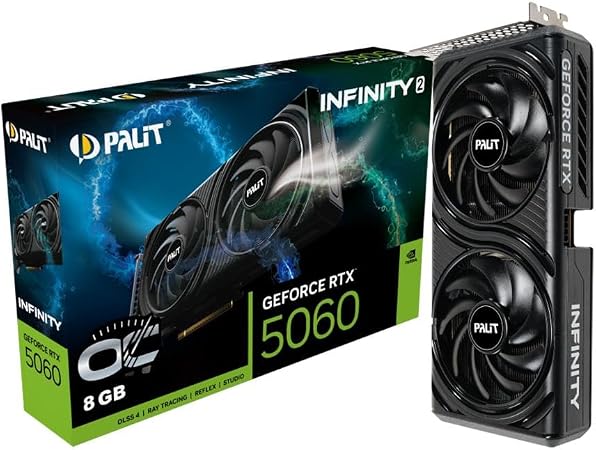
Quick answer: the Palit RTX 5060 Infinity 2 OC is a sensible RTX 5060 if its price is competitive with other partner cards. Palit is an established NVIDIA graphics-card manufacturer, not a separate GPU platform. You get the same underlying RTX 5060 Blackwell GPU, 3,840 CUDA cores, 8GB GDDR7 and NVIDIA feature set found in ASUS, MSI, Gigabyte and other RTX 5060 cards. The Palit model distinguishes itself with a true two-slot design, 2512 MHz factory boost clock, dual-fan cooler, 0-dB fan mode and relatively simple styling. The main reason not to buy it is not Palit. It is the RTX 5060's 8GB VRAM capacity. If an RX 9060 XT 16GB is close in price and you care more about VRAM and traditional raster gaming than NVIDIA-specific features, compare the Radeon carefully before ordering.
Is this the kind of GPU you actually need?
Palit makes the card. NVIDIA makes the GPU.
This distinction removes a lot of confusion. A Palit RTX 5060 is still an NVIDIA GeForce RTX 5060. Palit buys the NVIDIA GPU platform and builds the complete graphics card around it.
Is Palit a real graphics-card brand?
Yes. Palit says it has specialised in discrete graphics-card manufacturing for more than 30 years and describes Palit Group as NVIDIA's biggest authorised add-in-board partner.
Palit also says its graphics cards have reached more than 300 million users over the company's history. That is a Palit-reported figure, not an independent market-share measurement.
So the reason Palit can feel less familiar than ASUS to some Australian buyers is branding and regional retail exposure, not because Palit is a new company entering the GPU market.
Who actually makes what?
Palit, ASUS, MSI and Gigabyte are not alternative GPU architectures to NVIDIA. They are board partners.
Designs the GeForce RTX 5060 GPU architecture and provides the core NVIDIA software platform.
Designs and manufactures its Infinity 2 board, cooler, power delivery and factory tuning around the RTX 5060.
Runs NVIDIA drivers, DLSS, Reflex, Broadcast, Studio software and the normal GeForce ecosystem.
What do you get with the Infinity 2 OC?
The RTX 5060 has enough GPU performance for strong Full HD gaming. The 8GB framebuffer is the main reason to avoid treating it as an uncompromised long-term 1440p card.
Palit RTX 5060 Infinity 2 OC specifications
| Specification | Palit RTX 5060 Infinity 2 OC |
|---|---|
| Product Code | NE75060V19P1-GB2063L |
| GPU | NVIDIA GeForce RTX 5060 |
| Architecture | NVIDIA Blackwell |
| CUDA Cores | 3,840 |
| Graphics Clock | 2280 MHz |
| Boost Clock | 2512 MHz |
| Memory | 8GB GDDR7 |
| Memory Speed | 28 Gbps |
| Memory Interface | 128-bit |
| Memory Bandwidth | 448 GB/s |
| Bus | PCI Express 5.0 |
| HDMI | 1 × HDMI 2.1b |
| DisplayPort | 3 × DisplayPort 2.1b |
| Maximum Digital Output | 4K at 480Hz or 8K at 120Hz with DSC |
| Card Size | 262.1 × 126.3 × 40.1 mm |
| Slot Width | 2 slots |
| Graphics Card Power | 145W |
| Recommended System Power | 550W |
| External Power | 1 × 8-pin PCIe |
| Ray Tracing Cores | Fourth generation |
| Tensor Cores | Fifth generation |
| Cooling Features | Dual fan, composite heat pipe, copper base, 0-dB technology |
Is an ASUS RTX 5060 actually better?
Not automatically. The GPU doing the rendering is still the RTX 5060. The meaningful differences are the physical card built around it.
Infinity 2 OC
2512 MHz boost clock, 262.1mm length and a true two-slot cooler. Palit uses a composite heat pipe, copper base and 0-dB fan mode.
The design deliberately skips RGB lighting.
Dual RTX 5060
ASUS's standard Dual RTX 5060 is shorter at 228mm but thicker at 2.5 slots.
ASUS lists a 2497 MHz default boost on the standard model, while higher-clocked OC variants also exist.
| Specification | Palit Infinity 2 OC | ASUS Dual RTX 5060 |
|---|---|---|
| GPU | RTX 5060 | RTX 5060 |
| CUDA Cores | 3,840 | 3,840 |
| VRAM | 8GB GDDR7 | 8GB GDDR7 |
| Memory Speed | 28 Gbps | 28 Gbps |
| Palit / ASUS Default Boost | 2512 MHz | 2497 MHz |
| Length | 262.1mm | 228mm |
| Thickness | 2 slots | 2.5 slots |
| Recommended PSU | 550W | 550W |
| Power Connector | 1 × 8-pin | 1 × 8-pin |
| Outputs | 1 HDMI + 3 DisplayPort | 1 HDMI + 3 DisplayPort |
So which one should you buy?
Buy based on price, case fit, warranty support and the exact model, not simply the logo printed on the fan shroud.
The ASUS Dual is physically shorter. The Palit is thinner. Performance should remain close because both cards use the same RTX 5060 GPU and memory configuration.
A small factory-clock difference is much less important than a large price difference.
What kind of gaming performance does an RTX 5060 deliver?
These numbers come from independent TechSpot testing of the RTX 5060 GPU platform. They are not claimed as direct benchmark measurements of this exact Palit board. Partner-card performance should generally remain close unless cooling, clock behaviour or power limits differ significantly.
Benchmark results depend on CPU, game version, driver, graphics settings and test methodology. These figures are included to show the RTX 5060's general performance class, not as MyGPU measurements of the Palit Infinity 2 OC.
1080p is where this card is easiest to recommend
The RTX 5060 has enough raw GPU performance to handle a wide range of modern games at Full HD.
TechSpot's 18-game testing placed the RTX 5060 roughly around RTX 4060 Ti and RTX 3070 performance overall at 1080p, while showing a meaningful increase over the RTX 4060.
That gives it a useful place in high-refresh mainstream gaming.
Competitive games are particularly comfortable territory because they often put less pressure on the 8GB framebuffer than heavy cinematic AAA titles with maximum textures.
Fast memory does not fix limited capacity
This RTX 5060 has very fast 28 Gbps GDDR7 memory and 448 GB/s of theoretical memory bandwidth.
That is good.
The card still has only 8GB of physical VRAM.
TechSpot found several modern games where 8GB became a real issue at 1440p, including inconsistent frame times, very poor performance or texture-quality problems.
That does not make 8GB useless. MyGPU's own VRAM guide considers 8GB a reasonable fit for value-focused 1080p gaming when the price advantage is strong.
Sensible Fit
Watch Usage
Compare 16GB
Read the dedicated comparison: 16GB vs 8GB VRAM →
Palit vs AMD is really NVIDIA vs Radeon
Palit does not make an alternative GPU platform to AMD. The meaningful comparison is the NVIDIA RTX 5060 inside the Palit card versus AMD's competing Radeon GPU.
Palit RTX 5060
Choose this route when NVIDIA's features matter to you.
- DLSS with Multi Frame Generation.
- NVIDIA Reflex.
- NVIDIA Broadcast.
- NVIDIA Studio drivers.
- CUDA software ecosystem.
- Fourth-generation RT cores.
- Fifth-generation Tensor cores.
- G-SYNC support.
Radeon RX 9060 XT 16GB
Compare this route when VRAM capacity and raster performance are higher priorities.
- 16GB GDDR6 framebuffer.
- Double the RTX 5060's VRAM capacity.
- AMD FSR technologies.
- Radeon Anti-Lag 2.
- Radeon Fluid Motion Frames.
- Strong mainstream raster performance.
- 160W reference board power.
The Radeon RX 9060 XT 16GB is not automatically better simply because it has more VRAM. The correct choice depends on price, games, ray tracing, software and how long you intend to keep the GPU.
Read: RTX 5060 vs RX 9060 XT →
AMD can be faster in normal raster gaming
One reason the RX 9060 XT deserves a serious comparison is that independent testing has shown strong raster performance against the RTX 5060.
In TechSpot's later generation-to-generation mainstream comparison, the RX 9060 XT 8GB averaged 21% more performance at 1080p and 18% more at 1440p than the RTX 5060 in that specific test suite.
The 16GB Radeon version also exists, adding significantly more memory capacity.
That does not settle the buying decision by itself. NVIDIA's DLSS ecosystem, CUDA support, creator software, Broadcast tools and ray-tracing behaviour can still make the RTX 5060 the better card for some buyers.
This is why the Palit needs to be judged at its actual Australian purchase price.
DLSS is a real part of the RTX 5060 buying decision
DLSS is not one magic FPS switch. Several technologies sit under the DLSS family, and they solve different problems.
Renders internally at a lower resolution and reconstructs the image to a higher output resolution.
Uses AI reconstruction in supported ray-traced games instead of relying only on traditional denoisers.
Generates additional frames between traditionally rendered frames in compatible games.
Generated-frame FPS should never be confused with native GPU rendering performance. When comparing benchmark graphs, check whether the numbers are native, upscaled or using frame generation.
Yes, it has modern RT hardware. No, it is not a high-end RT card.
The RTX 5060 uses NVIDIA Blackwell and fourth-generation ray-tracing cores.
That gives it much more relevant ray-tracing hardware than older GTX graphics cards.
The limitation is still the performance class and 8GB memory pool.
TechSpot's testing found some ray-traced games worked reasonably well at 1080p with DLSS, while more demanding scenarios struggled heavily.
That is the right expectation: ray tracing is a feature you can use selectively on this card, not a reason to expect flagship-level RT performance.
Palit or ASUS does not change the CUDA ecosystem
If you use video editing, 3D software, streaming tools or AI applications that support NVIDIA, the Palit card works within the same broad GeForce ecosystem as other RTX 5060 models.
Palit lists NVIDIA Studio drivers, NVIDIA Broadcast and the current Blackwell creator feature set.
The main limitation for heavy creator or AI workloads is again the 8GB framebuffer.
For light editing, streaming and normal GPU acceleration that may be completely fine. Large 3D scenes, local AI models and memory-heavy professional projects deserve a higher-memory GPU.
Infinity 2 uses a simple dual-fan, two-slot design
Palit uses a composite heat pipe that combines grooved and sintered structures, a copper base and dual fans.
Palit also includes 0-dB technology. Under sufficiently light GPU load, the fans can stop rather than spinning continuously.
The card deliberately avoids lighting effects. That can be an advantage if you want a simple build rather than paying for RGB you do not want.
Dimensions
262.1 × 126.3 × 40.1 mm
Measure GPU clearance before ordering, especially in compact cases.
Slot width
2 slots
This is thinner than several chunky 2.5-slot partner cards.
A 145W GPU is relatively easy to build around
Palit lists graphics-card power at 145W.
The card uses one 8-pin PCIe power connector and Palit recommends 550W system power.
That gives the RTX 5060 a practical upgrade advantage over substantially more power-hungry cards.
You should still judge the PSU by quality, age, CPU choice and total system configuration rather than looking only at the wattage number printed on the label.
Modern display connectivity is not a concern
Palit equips the Infinity 2 OC with:
HDMI 2.1b
One HDMI connection for modern monitors, TVs and compatible high-refresh displays.
3 × DisplayPort 2.1b
Three DisplayPort connections give multi-monitor users plenty of flexibility.
Palit lists support up to 4K at 480Hz or 8K at 120Hz with DSC. That is display-output capability, not a claim that the RTX 5060 can render modern AAA games natively at those resolutions and frame rates.
See whether the Palit RTX 5060 fits your build
Select what matters to you most. This tool is designed around the actual strengths and compromises of an 8GB RTX 5060.
Choose your setup above and the tool will explain what deserves the closest comparison.
The buyers this Palit makes the most sense for
1080p NVIDIA Gamer
You want good Full HD performance, DLSS, Reflex and modern GeForce features without moving into a higher GPU tier.
Value-Focused Palit Buyer
The Palit is cheaper than premium ASUS or other partner cards and you care more about GPU performance than brand prestige.
Two-Slot Builder
You specifically need a true two-slot RTX 5060 rather than a thicker 2.5-slot board.
Cases where I would compare another GPU first
Heavy 1440p + Long Ownership
Eight gigabytes becomes harder to defend when the card is expected to handle future high-texture games at 1440p for several years.
Compare 16GB alternatives.
RX 9060 XT 16GB Is Similar in Price
If the Radeon costs roughly the same, twice the VRAM and strong raster performance make it too important to ignore.
Palit Costs More Than Better-Cooled RTX 5060 Cards
The Palit badge itself is not a reason to pay a large premium. Compare card design, warranty and retailer support.
4K Is Your Main Goal
Do not buy an RTX 5060 expecting uncompromised modern 4K gaming. Move higher up the GPU stack.
What the Palit does well and where the RTX 5060 compromises
What we like
- Strong mainstream 1080p performance.
- Fast 28 Gbps GDDR7 memory.
- 448 GB/s memory bandwidth.
- NVIDIA Blackwell architecture.
- DLSS and Multi Frame Generation support.
- NVIDIA Reflex.
- NVIDIA Broadcast.
- Studio driver support.
- CUDA ecosystem.
- Factory-overclocked Palit board.
- True two-slot design.
- Dual-fan cooling.
- 0-dB fan mode.
- One standard 8-pin power connector.
- Relatively modest 145W card power.
- HDMI 2.1b and DisplayPort 2.1b.
What to consider
- Only 8GB of VRAM.
- Heavy 1440p games can run into memory limits.
- RX 9060 XT can offer stronger raster performance.
- RX 9060 XT 16GB doubles the memory capacity.
- Palit is longer than the ASUS Dual RTX 5060.
- Factory overclock differences are small.
- No RGB if lighting matters to your build.
- It should not command a large premium over another RTX 5060.
Is the Palit RTX 5060 Infinity 2 OC worth buying?
Yes, if the price is right and your main target is 1080p gaming.
Palit itself should not be the reason you avoid this card. It is an established NVIDIA board partner with decades of graphics-card manufacturing experience.
The Infinity 2 OC is a straightforward RTX 5060 implementation. It gives you a small factory overclock, dual-fan cooling, a proper copper-base cooling system, 0-dB technology and a useful true two-slot form factor.
I would not pay a large premium for those features over another well-built RTX 5060. Partner-card differences do not turn the RTX 5060 into another performance tier.
The harder question is whether an 8GB RTX 5060 is the right GPU.
For a value-focused 1080p system where DLSS, Reflex, Broadcast, CUDA or NVIDIA's broader software ecosystem matters, the answer can easily be yes.
For a buyer targeting heavy 1440p gaming, high-resolution texture packs and several years of ownership, I would compare the RX 9060 XT 16GB and RTX 5060 Ti options before buying.
The simplest buying rule is this: buy the Palit if it is one of the better-priced RTX 5060 cards. Do not buy it simply because it says OC on the box.
Check Palit RTX 5060 Infinity 2 OC AvailabilityCompare the current delivered price with other RTX 5060 cards and the RX 9060 XT 16GB before ordering.
More research from MyGPU Australia
RTX 5060 Review
Read the complete GPU-level review if you care more about the RTX 5060 itself than Palit's specific implementation.
RTX 5060 vs RX 9060 XT
Compare NVIDIA's feature ecosystem with AMD's raster performance and higher-memory options.
16GB vs 8GB VRAM
Find out when the Palit's 8GB capacity is enough and when paying for more memory makes sense.
Best GPU for 1080p Gaming Australia
Compare the RTX 5060 against the wider Full HD GPU market.
1080p GPU Benchmarks
Understand the benchmark data that matters for high-refresh Full HD gaming.
1440p GPU Benchmarks
See why VRAM becomes a bigger consideration when resolution and texture requirements increase.
NVIDIA vs AMD
Compare the software, gaming and creator ecosystems before choosing your GPU platform.
GPU Comparison Centre
Browse direct GPU matchups before choosing a specific board.
GPU Benchmark Hierarchy
See where the RTX 5060 sits in the broader performance stack.
Best GPU Under $500 AUD
Check whether the RTX 5060 is actually one of the better purchases at your current Australian budget.
Palit RTX 5060 Infinity 2 OC questions
Is Palit a good graphics-card brand?
Is Palit the same as NVIDIA?
Is Palit different from ASUS?
Is the Palit RTX 5060 faster than the ASUS RTX 5060?
What is the product code for the Palit RTX 5060 Infinity 2 OC?
How much VRAM does the Palit RTX 5060 have?
What is the memory bandwidth?
What is the Palit RTX 5060 Infinity 2 OC boost clock?
How many CUDA cores does the RTX 5060 have?
Is the Palit RTX 5060 good for 1080p?
Is the RTX 5060 good for 1440p?
Is 8GB of VRAM enough?
Does the Palit RTX 5060 support DLSS?
Does it support ray tracing?
Does the Palit Infinity 2 OC have RGB?
Does the Palit RTX 5060 stop its fans at idle?
How big is the Palit RTX 5060 Infinity 2 OC?
Is it a two-slot GPU?
What PSU does the Palit RTX 5060 require?
What power connector does it use?
Should I buy RTX 5060 or RX 9060 XT?
Is the Palit RTX 5060 Infinity 2 OC worth buying?
Sources used for this review
Palit-specific dimensions, clock speeds, memory specifications, power requirements and cooling features were checked against Palit. ASUS specifications were checked against ASUS for the direct partner-card comparison. RTX 5060 gaming behaviour was cross-checked against independent testing rather than using NVIDIA or Palit marketing numbers as MyGPU benchmarks.
- Palit GeForce RTX 5060 Infinity 2 OC official product page
- Palit company information
- Palit company history and user-reach claim
- ASUS Dual GeForce RTX 5060 official specifications
- TechSpot RTX 5060 independent gaming benchmarks
- Gamers Nexus RTX 5060 independent testing
- AMD Radeon RX 9060 XT 16GB specifications
- TechSpot mainstream GeForce vs Radeon comparison
- Google Search Central high-quality review guidance