
XFX Radeon AI PRO R9700 32GB
This is not another expensive gaming card. The Radeon AI PRO R9700 is built around a different problem: fitting serious AI models into local GPU memory and running them on a workstation you control. XFX combines AMD RDNA 4, 32GB of GDDR6, 128 AI accelerators, PCIe 5.0 and a dual-slot blower design aimed at AI developers, professional creators and multi-GPU workstations.
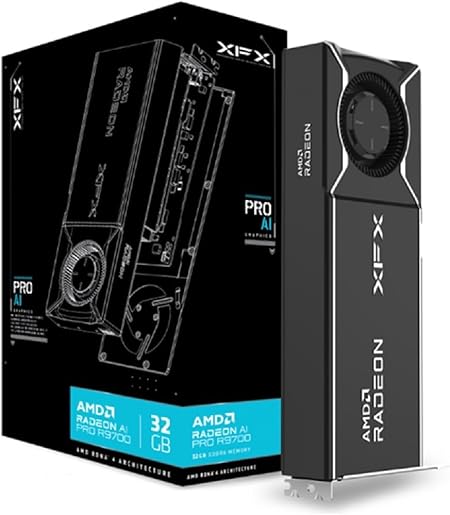
Quick answer: the XFX Radeon AI PRO R9700 32GB makes the most sense for professionals who need more GPU memory than mainstream 16GB and 24GB cards provide, particularly for local LLM inference, diffusion models, model fine-tuning, large creative projects and multi-GPU workstations. Its 32GB framebuffer is the main reason to buy it. ROCm software support is the main thing to investigate before spending the money. If your workflow depends on CUDA-only software, buying this card because the hardware looks good on paper can be an expensive mistake.
Who is the R9700 actually for?
A workstation GPU should be selected by workload first. The R9700 is attractive when GPU memory capacity and open AMD compute support solve a problem your current hardware cannot.
32GB gives substantially more model-fit headroom than typical 12GB and 16GB consumer GPUs.
ComfyUI, diffusion and other GPU-heavy AI workflows can benefit from the large local memory pool.
The dual-slot blower format makes dense professional configurations much more practical.
If an application or model stack expects NVIDIA CUDA, 32GB of VRAM cannot fix incompatible software.
The specification that changes everything is 32GB
The main reason this GPU exists. Large models that spill out of smaller GPUs may fit entirely inside local video memory.
32GB can matter more than another benchmark win
AI workloads have a hard constraint that normal gaming benchmarks often hide: the model, active tensors, KV cache and runtime overhead need somewhere to live.
When a workload fits completely inside GPU memory, the GPU can work directly from its much faster local memory. When it does not fit, the workflow may need CPU memory offloading, reduced precision, smaller context, a smaller model or another GPU.
That is why a 32GB professional card can be more useful than a faster gaming GPU with less VRAM for the right AI workload.
Small Models
More Room
Serious AI
Larger Local Models
For the broader memory explanation, read: What Is VRAM? →
Will your AI model fit inside 32GB?
Choose a model size and approximate weight precision. The tool estimates memory used by model weights and adds a 20% working allowance. It is a planning tool, not a guarantee. Real memory usage can increase with context length, KV cache, batch size, framework overhead, activations, multimodal models and fine-tuning.
Select the model configuration above, then run the estimate.
Estimates model weights plus the selected allowance. Context and runtime requirements can increase actual usage.XFX Radeon AI PRO R9700 RX-97XPROAIY specs
| Specification | XFX Radeon AI PRO R9700 |
|---|---|
| Model | RX-97XPROAIY |
| GPU | AMD Radeon AI PRO R9700 |
| Architecture | AMD RDNA 4 |
| Compute Units | 64 |
| AI Accelerators | 128 second-generation AI accelerators |
| Stream Processors | 4,096 |
| Base Clock | Up to 1620 MHz |
| Game Clock | Up to 2350 MHz |
| Boost Clock | Up to 2920 MHz |
| Dedicated Memory | 32GB GDDR6 |
| Memory Speed | 20 Gbps |
| Memory Interface | 256-bit |
| Peak Memory Bandwidth | 640 GB/s |
| Infinity Cache | 64MB |
| PCI Express | PCIe 5.0 |
| Card Profile | Dual slot |
| Cooling | Blower fan |
| Dimensions | 267 × 99 × 35 mm |
| Display Outputs | 4 × DisplayPort 2.1a |
| External Power | 1 × 12V-2x6 |
| Total Board Power | 300W |
| Minimum PSU | 750W |
| FP32 Vector Peak | 47.8 TFLOPS |
| FP16 Matrix Peak | 191 TFLOPS |
| FP8 Matrix Peak | 383 TFLOPS |
| INT8 Matrix Peak | 383 TOPS |
| INT8 With Structured Sparsity | 766 TOPS |
| INT4 Matrix Peak | 766 TOPS |
| INT4 With Structured Sparsity | 1,531 TOPS |
| Hardware Media | H.264, H.265 / HEVC and AV1 encode + decode |
| Memory ECC | Supported on Linux |
FP8, INT8 and INT4 are not marketing footnotes
AI models do not always need every parameter stored and calculated at full precision. Lower precision can reduce memory requirements and increase throughput when the software and model support it.
Useful for training, fine-tuning and workloads where more numerical precision is needed.
Reduces storage and compute requirements when the framework and workload can use FP8 effectively.
Useful for AI inference workloads designed for reduced precision.
Very low precision can increase throughput substantially when a compatible model and runtime can use it.
Why the precision used by your workload matters
A single "TOPS" number does not describe every AI workload. Different precisions, matrix instructions, sparsity support and software paths can produce very different real results.
These are theoretical AMD peak specifications. They are not expected application performance. Real throughput depends heavily on software implementation, model architecture, precision, memory access and framework support.
ROCm is the part you need to research before buying
Powerful hardware is useful only when your software can use it. AMD's ROCm platform is the compute layer that makes the R9700 interesting for local AI and machine-learning workflows.
RDNA 4 GPU with 32GB VRAM.
AMD's open GPU compute platform.
Common AI framework with ROCm support.
Common routes for local LLM inference.
LLM, image, video or custom AI pipeline.
AMD currently lists the Radeon AI PRO R9700 as supported by its current ROCm/HIP ecosystem. Linux remains the most natural environment for advanced ROCm workstation deployments. Windows support has improved and the R9700 is officially supported by AMD's HIP SDK, but specific framework and ROCm component support should still be checked before building a Windows-first AI workstation.
Hardware compatibility is not software compatibility
Linux + ROCm
The most mature route for users building an R9700 workstation around ROCm, PyTorch, vLLM and professional AI development.
Windows AI
AMD officially supports the R9700 through its Windows HIP SDK and supported PyTorch configurations, but not every part of every ROCm workflow is identical to Linux.
CUDA Software
Software written specifically around CUDA may require NVIDIA. Verify the exact application, plugin and renderer before assuming a Radeon alternative will work.
The R9700's real advantage is keeping more of the model on the GPU
Large language model performance is not determined by VRAM alone. Memory bandwidth, compute throughput, quantisation, software kernels, context length and runtime optimisation all matter.
VRAM does determine something more basic: whether the model fits.
AMD specifically calls out models such as Mistral and Qwen 32B-class workloads as examples of where 32GB can avoid the limits of smaller 16GB GPUs.
That does not mean every 32B model fits at every precision. A 32-billion-parameter model stored as FP16 weights alone would need roughly 64GB before runtime overhead. Quantised versions can reduce that requirement dramatically.
Where 32GB helps
- Larger quantised LLMs.
- Larger context windows.
- Larger diffusion models.
- Larger batches.
- Multimodal workflows.
- Fine-tuning where memory permits.
What 32GB does not guarantee
- CUDA software compatibility.
- Faster performance than every NVIDIA GPU.
- Enough memory for every 70B model configuration.
- Perfect scaling across multiple GPUs.
- Identical support on Linux and Windows.
32GB gives ComfyUI workflows room to breathe
AMD has published official ComfyUI guidance and benchmark work using the Radeon AI PRO R9700. The large framebuffer is useful because modern generative-image and generative-video workflows can load several components into GPU memory at the same time.
Depending on the workflow, memory may be consumed by the diffusion model, text encoders, VAE, ControlNet-style components, LoRAs, intermediate tensors and the output resolution.
More VRAM does not automatically make image generation faster. It does reduce the number of situations where memory pressure forces offloading or a smaller workflow.
AMD's own ROCm documentation includes the R9700 in its supported Radeon AI hardware, and AMD has published ComfyUI setup material specifically around the card.
One card gives you 32GB. Four cards change the scale of the workstation.
AMD designed the R9700 with multi-GPU AI workstations in mind. That does not mean VRAM magically becomes one giant pool in every application. The software must know how to split the model or workload across GPUs.
Puget Systems has independently tested dual R9700 configurations using vLLM and llama.cpp under ROCm, showing why multi-GPU behaviour needs workload-specific testing rather than a simple "2 GPUs = 2x" assumption.
The blower cooler makes much more sense here than on a gaming card
The XFX card uses a compact dual-slot blower layout instead of a huge open-air triple-fan cooler. That choice matters when you want multiple GPUs in one workstation.
Why blower cooling exists
Open-air gaming cards dump much of their heat back into the case. A blower-style professional card is designed around moving air through the card and exhausting it in a more controlled direction.
That can be useful when several cards sit close together.
The tradeoff is that blower acoustics can differ from large open-air gaming coolers. Because this page is research-based rather than a hands-on acoustic test, we are not inventing a noise measurement.
XFX dimensions: 267 × 99 × 35 mm with a dual-slot profile.
This is workstation power, not a casual upgrade
AMD specifies a 300W total board power for the Radeon AI PRO R9700. XFX requires one 12V-2x6 external power connector and lists a 750W minimum power-supply requirement.
One 750W PSU recommendation does not mean a 750W unit is suitable for every R9700 workstation. A high-core-count Threadripper, large memory configuration, many drives and multiple GPUs can change power requirements dramatically.
Multi-GPU systems should be designed around the complete sustained workstation load, power-delivery topology and cooling plan.
Four DisplayPort 2.1a outputs
XFX gives the card four DisplayPort 2.1a connections.
That makes sense for professional workstations driving multiple high-resolution displays, production monitors, dashboards or engineering visualisation environments.
There is no HDMI output listed on this XFX board. If your workflow requires HDMI directly from the card, plan around DisplayPort connectivity or a suitable adapter before ordering.
ECC support matters more in long professional workloads
AMD lists memory ECC support for the R9700 on Linux.
Error-correcting memory can detect and correct certain memory errors, which can matter more when a GPU is being used for long-running professional compute jobs rather than short gaming sessions.
The operating-system qualification matters here. Do not assume the same ECC behaviour or management options exist across every software environment.
R9700 vs the cards buyers are likely to cross-shop
These products are not interchangeable. A GeForce flagship, a Radeon workstation card and an RTX PRO card can have similar VRAM numbers while targeting different software, certification and workload priorities.
R9700 vs RTX PRO 4000, RTX 5090 and W7900
| GPU | VRAM | Main Reason To Consider It | Main Thing To Check |
|---|---|---|---|
| RTX PRO 4000 Blackwell | 24GB GDDR7 ECC | NVIDIA professional ecosystem, CUDA and certified workstation workflows. | 24GB may be the memory limit for larger local AI models. |
| XFX Radeon AI PRO R9700 | 32GB GDDR6 | Large local AI memory pool, ROCm and multi-GPU workstation value. | Confirm software support before buying. |
| GeForce RTX 5090 | 32GB GDDR7 | Very high compute performance plus CUDA and broad creator support. | 575W graphics power and consumer rather than professional positioning. |
| Radeon PRO W7900 | 48GB GDDR6 | Larger professional memory pool and workstation graphics workloads. | Different architecture, price point and AI-performance profile. |
R9700 vs RTX PRO 4000 Blackwell
The RTX PRO 4000 Blackwell is an important comparison because both cards target professional users rather than ordinary gaming builds.
NVIDIA gives the RTX PRO 4000 24GB of ECC GDDR7 memory and access to its CUDA, RTX and professional workstation ecosystem.
AMD's argument is different: the R9700 gives you 32GB of GPU memory and an open ROCm route aimed directly at local AI workloads.
R9700 makes more sense when
- Your model needs more than 24GB.
- ROCm supports your stack.
- Local LLM inference is the main workload.
- Multi-GPU capacity is part of the plan.
- VRAM per dollar matters heavily.
RTX PRO deserves comparison when
- CUDA is required.
- NVIDIA-certified applications matter.
- Your pipeline already runs on NVIDIA.
- 24GB is enough for the workload.
R9700 vs RTX 5090 is not just a speed comparison
Both GPUs offer 32GB of dedicated graphics memory. That is where the simple comparison ends.
NVIDIA's RTX 5090 is a consumer flagship with extremely high compute performance, 32GB GDDR7 and the broad CUDA ecosystem. NVIDIA lists 575W total graphics power.
The R9700 is a 300W professional AI card with a compact dual-slot blower layout designed to be easier to deploy in workstation and multi-GPU environments.
If raw single-GPU compute and CUDA compatibility dominate your decision, the RTX 5090 needs to be on the shortlist. If you are building a dense multi-GPU workstation around 32GB cards, system architecture, power and slot spacing become much more important.
Read: RTX 5090 Review →
What if 32GB is not enough?
AMD's Radeon PRO W7900 moves to a 48GB GDDR6 framebuffer.
That extra 16GB can matter when model capacity or professional scene size is the hard constraint.
The W7900 and R9700 should not be compared only by memory. They use different Radeon architectures and target somewhat different professional priorities.
The R9700's RDNA 4 AI accelerators and low-precision AI support make it especially interesting for newer AI workloads, while the W7900's 48GB remains valuable when maximum local memory is the deciding factor.
The R9700 can also be a real professional graphics card
Independent Linux testing from Phoronix found the Radeon AI PRO R9700 competitive in professional workstation graphics workloads and substantially faster than the older RTX 4000 Ada in several SPECviewperf tests.
That does not mean one workstation benchmark determines every engineering or creative application. Professional applications can depend on drivers, APIs and vendor certification.
The correct approach is to check your actual software before purchase.
MyGPU has a broader workload framework here: Gaming vs Creative Workloads →
Hardware AV1, H.264 and HEVC support
XFX lists hardware encode and decode support for AV1, H.264 and H.265 / HEVC.
That matters for video workflows, streaming, transcodes and AI-media pipelines.
Codec support alone does not tell you how well a card performs inside Premiere Pro, DaVinci Resolve or another editor. Application optimisation and plugin support still need to be checked.
Workstation GPU does not mean datacenter GPU
AMD and XFX state that Radeon PRO W6000, W7000 and Radeon AI PRO R9000-series graphics cards are not designed or recommended for datacenter usage.
That distinction matters. A desktop or professional workstation running local AI is not the same deployment environment as a managed datacenter GPU platform.
If the intended use is a commercial datacenter, colocation facility or large production server deployment, verify AMD's supported product family and licensing requirements before purchasing.
Does the Radeon AI PRO R9700 fit your actual workload?
The card is expensive enough that software fit should come before enthusiasm about specifications.
Choose your software and memory requirement above.
What makes the R9700 special and what can stop it being the right card
What stands out
- 32GB dedicated GDDR6 VRAM.
- 640 GB/s memory bandwidth.
- RDNA 4 architecture.
- 128 second-generation AI accelerators.
- FP8 support.
- Strong low-precision AI throughput.
- Official ROCm support.
- PCI Express 5.0.
- Dual-slot workstation form factor.
- Blower cooling suited to dense systems.
- Four DisplayPort 2.1a outputs.
- AV1 hardware encode and decode.
- Linux memory ECC support.
- Multi-GPU AI potential.
What requires careful checking
- CUDA-only software may rule it out immediately.
- Windows ROCm support differs from the complete Linux stack.
- 32GB is still not enough for every large model.
- Multi-GPU VRAM does not automatically behave as one memory pool.
- 300W board power requires proper workstation cooling.
- XFX requires a 12V-2x6 power connector.
- XFX recommends at least a 750W PSU.
- Blower acoustic behaviour differs from large gaming coolers.
- It is not a datacenter accelerator.
- It is overkill for buyers who mainly want gaming performance.
Who should spend this much on the R9700?
Local AI Developer
You know your tools work with ROCm, your models are running into 16GB or 24GB limits, and keeping inference local matters.
AI Creator
Your ComfyUI or generative-media workflows are constrained by VRAM and the software stack supports AMD well.
Multi-GPU Builder
You specifically need dual-slot blower cards that can be installed together in a high-lane-count workstation.
Who should probably look elsewhere?
A gamer who only occasionally experiments with AI probably does not need an AI PRO card. Someone whose workflow depends on CUDA should compare NVIDIA first. Anyone whose workload needs more than 32GB on a single GPU should compare larger-memory professional cards before ordering.
Is the XFX Radeon AI PRO R9700 32GB worth the money?
It can be, but only if the 32GB framebuffer solves a real problem.
That is the key to understanding this product. You are not paying this much because you want a prettier gaming benchmark chart. You are paying for the ability to keep larger AI workloads in local GPU memory, use RDNA 4's AI accelerators and build a professional workstation around ROCm.
XFX's implementation makes sense for that job. The card is only 267mm long, uses two slots, has a blower cooler, exposes four DisplayPort 2.1a outputs and can fit into workstation designs where giant three and four-slot gaming cards become awkward.
The catch is software. A CUDA dependency can matter more than 32GB VRAM. A framework version can matter more than peak TOPS. A model that needs 40GB still does not fit on a 32GB card.
For a buyer who has already checked those points and specifically needs a 32GB local AI GPU, the Radeon AI PRO R9700 is one of the most interesting AMD workstation options to investigate.
Check XFX Radeon AI PRO R9700 AvailabilityProfessional GPU pricing and stock can move significantly. Check the current delivered price and warranty before ordering.
More MyGPU Australia workstation and GPU guides
Best GPU Australia
Start with workload, budget and system requirements before narrowing down individual graphics cards.
Gaming vs Creative Workloads
See why one universal GPU score cannot represent gaming, rendering, video and local AI.
What Is VRAM?
Understand why dedicated GPU memory can become the hard limit for local AI and professional workloads.
16GB vs 8GB VRAM
Start with the lower memory tiers before deciding whether a specialist 32GB GPU is really necessary.
GPU Benchmark Hierarchy
Compare general GPU performance tiers while remembering that AI and workstation workloads need their own application tests.
GPU Benchmarks
Learn which benchmark types actually matter for gaming, creative work and local AI.
GPU Performance Per Dollar
Professional value should use the performance metric that matches the actual workload.
RTX 5090 Review
Compare another 32GB GPU when CUDA compatibility and extreme single-GPU compute matter.
NVIDIA vs AMD
Compare software ecosystems before choosing a GPU for a professional workstation.
GPU Comparison Centre
Compare complete graphics-card platforms instead of buying from a single specification.
Radeon AI PRO R9700 questions
How much VRAM does the Radeon AI PRO R9700 have?
What is the memory bandwidth of the R9700?
Is the Radeon AI PRO R9700 made for local AI?
Does the R9700 support ROCm?
Does ROCm work with the R9700 on Windows?
Does the R9700 support PyTorch?
Can the Radeon AI PRO R9700 run 32B language models?
Can a 70B model fit on one R9700?
Can I use two R9700 GPUs together?
Does two R9700 GPUs mean I have one 64GB GPU?
How many AI accelerators does the R9700 have?
Does the R9700 support FP8?
What is the R9700 INT8 performance?
What is the R9700 INT4 performance?
How much power does the Radeon AI PRO R9700 use?
What PSU does the XFX R9700 require?
What power connector does the XFX R9700 use?
How large is the XFX Radeon AI PRO R9700?
What display outputs does the XFX R9700 have?
Does the XFX R9700 have HDMI?
Does the R9700 support AV1 encoding?
Does the Radeon AI PRO R9700 support ECC memory?
Is the Radeon AI PRO R9700 good for gaming?
Is the R9700 better than the RTX 5090 for AI?
Is the R9700 a datacenter GPU?
Sources used for this guide
Product-specific specifications were checked against XFX. Architecture, memory, AI precision and power specifications were checked against AMD. ROCm guidance was checked against AMD's current documentation. Independent AI and workstation context was cross-checked against Puget Systems and Phoronix.
- XFX Radeon AI PRO R9700 official product information
- XFX RX-97XPROAIY detailed technical specifications
- AMD Radeon AI PRO R9700 official specifications
- AMD ROCm official documentation
- AMD HIP SDK Windows hardware support matrix
- Puget Systems R9700 dual-GPU AI inference testing
- Phoronix R9700 Linux single and multi-GPU testing
- Phoronix R9700 professional workstation graphics testing
- NVIDIA RTX PRO 4000 Blackwell specifications
- NVIDIA GeForce RTX 5090 specifications
- AMD Radeon PRO W7900 specifications
- Google guidance for high-quality product reviews
- FTC affiliate and endorsement disclosure guidance